The HILLS APP says that my membership is temporary. Can I still keep using the app without issue?
You will need to register as a full member to use the Hills Points you have accrued, and to make use of various services and features.
Tap “Member registration/login” on the home screen of the HILLS APP, and follow the steps shown to register as a new member.
We also ask that members who have already used the HILLS CARD should register their personal information, such as their name and address.
Why didn't I get the one-time password e-mail at the e-mail address I entered when registering my HILLS ID?
If there are no issues with the email address registered to HILLS ID, it may be that you have blocked emails from being sent to you. Please allow emails from no-reply@hills-id.com. If you still do not receive emails, please contact HILLS APP/HILLS CARD Customer Center (03-6406-6410 / 10:00-18:00, open every day).
I don't know how to change the HILLS ID when I change my email address when changing models.
When logging in with a new device, you will need to enter the one-time password that will be sent to the email address registered to HILLS ID.
If the email address registered to HILLS ID is invalid, please log in to My Page on HILLS APP / HILLS CARD website and change it to a current valid email address by clicking "Change HILLS ID."
After making the change, log in to HILLS APP again on your new device to receive a one-time password.
Can I share a single HILLS ID with other family members?
Each HILLS ID is Intended for use by one person only. You may not share a HILLS ID with other members of this service.
I accidentally registered multiple HILLS IDs.
Different HILLS IDs may not be combined.
I can’t properly set my login password.
You password must contain at least eight characters, including a mixture of at least three of the following four kinds of characters: uppercase letters, lowercase letters, numbers and symbols.
You cannot set your password to be the same as your HILLS ID.
My login password is locked.
The password will be unlocked 15 minutes after you receive a notification e-mail. Please login once your password is unlocked. If you have forgotten your password, please click "Did you forgot your password?" below the login button on the login screen to reset it.
(You will need to enter your PIN code to reset your password.)
How can I change my login password?
If you are using HILLS APP: Tap your name in the menu and you will see the option to "Change Password."
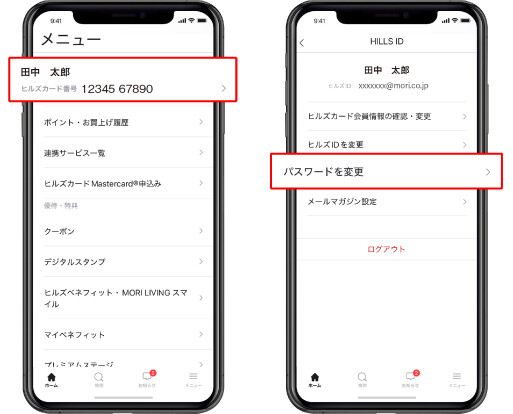
If you are using the website: There is a "Change Password" option on My Page.
My Page>Please follow one of the procedures above.
What do I do if I’ve forgotten my login password?
If you have forgotten your password, please click "Did you forgot your password?" below the login button on the login screen to reset it.
(You will need to enter your PIN code to reset your password.)
What do I do if I've forgotten my HILLS ID?
please contact the HILLS APP/HILLS CARD Customer Center (03-6406-6410; open from 10:00 am through 6:00 pm year-round)
I would like to change HILLS ID (email address).
If you are using HILLS APP: Tap your name in the menu and you will see the option to "Change HILLS ID."
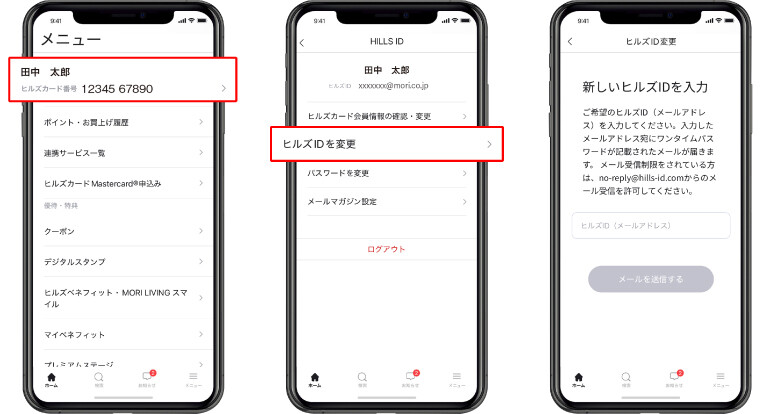
If you are using the website: There is an option to "Change HILLS ID" on My Page.
My Page>Please complete one of the procedures above. After entering your desired HILLS ID (email address), an email containing a one-time password will be sent to the email address you entered. Please follow the instructions to change your password.
If you would like to receive email news, please change the email address in your membership information.
What should I do if my PIN code is locked?
please contact the HILLS APP/HILLS CARD Customer Center (03-6406-6410; open from 10:00 am through 6:00 pm year-round)
What should I do if I've forgotten my PIN code?
please contact the HILLS APP/HILLS CARD Customer Center (03-6406-6410; open from 10:00 am through 6:00 pm year-round)
How can I change my PIN code?
please contact the HILLS APP/HILLS CARD Customer Center (03-6406-6410; open from 10:00 am through 6:00 pm year-round)